Since the beta of EA/DICE's Battlefield Bad Company 2, forums have had a myriad of posts with game problems, with this symptom included in the posts. Since retail release of the game, and the subsequent release of Medal of Honor by the same publisher/developer teams, the same has been seen for the latter game.
Specifically, the event log entry in the windows system log is:
Event 36888, Schannel
The following fatal alert was generated: 10. The internal error state is 10.
When I first saw the error myself, I recognized it from my network programming days as an informational error, indicating some kind of barf-o-rama on the server side of a secure connection handshake. Unlike most of the other Schannel event IDs, this particular one seems to remain undocumented. Nonetheless, the Info opcode and 10 / 10 Alert Description and Error State hint strongly at it being server side.
Since it seemed to have no material effect on the playability of the game(s), my interest in investigating it stopped there. A recent poster, however, indicated that disabling their AV (Trend) caused the apparently related game issues to be remedied. While it appears that the game itself runs correcly despite encountering the Schannel error, it may be that some A/V that muck with everything on the wire might take drastic action in the face of it. Strange if some do, but plausible.
In any case, barring some other application / utility causing problems (e.g., said A/V), the error itself can be safely ignored. If it really bothers you, you can change the logging level via a registry change by modifying (or adding if needed) the key:
HKEY_LOCAL_MACHINE\System\CurrentControlSet\Control\SecurityProviders\SCHANNEL
DWORD value EventLogging with a value of 0 will eliminate such event log messages. Note that current versions of windows seem to be more voluble for these errors - on older (e.g. XP), the error may occur without a log entry being generated.
I became interested again in this event / error recently while tracing the traffic activity of the game debugging a separate issue. Both games are built on the same engine / network infrastructure, so it is not surprising they share the same frailties.
From an outsider's view (since I have no access to the game source code, nor the EA master or game servers, my view must be the result of probing and testing theories, using debuggers and traffic sniffers), the network infrastructure for these games is a bit of a wreck. In the same way one might surmise their neighbor is a slob from observations of the trash bags thrown on their front lawn, the mishmash of connections and traffic these games generate is appalling. The possibilities of problems due to one piece failing or being unavailable are surely a source of grief for many attempting to play these games online.
If this system was designed this way from scratch, someone should be publicly whipped with a length Ethernet cable. If it is the result of 'evolution' of features and functionality by adding servers to the 'master' pool, the time has come perhaps for EA to rethink the infrastructure and rebuild it from scratch.
In any case, the Schannel error in these games appears to be generated by an improperly configured EA server that provides them with hardware information à la Steam's hardware survey.
Another way to eliminate the error (and stop spying by EA, if that's your stance), is to add the following to the file \windows\system32\drivers\etc\hosts:
127.0.0.1 bf1943hwtelemetry.ea.com
This prevents the game(s) from even starting the handshake process, short-circuiting the error path.
In summary: The error is harmless, it is not the cause of crashes / etc. in the game itself per se though it appears it might throw programs such as A/V into a tizzy (when I feel like it, I may investigate this further.) You can just ignore it, or if it bothers you having it in your event log, take one or both of the steps outlined above.
Showing posts with label Hardware and Software Related. Show all posts
Showing posts with label Hardware and Software Related. Show all posts
Wednesday, October 27, 2010

Wednesday, May 19, 2010
Nim Chimpsky Plays A Game: A Simple Game Played With Simple Recursion
Nim Chimpsky, named as a pun of Noam Chomsky the brilliant linguist, cognitive scientist and philosopher, was a chimpanzee that researcher Herbert S. Terrace of Columbia University claimed had learned a form of sign language and was able to communicate intelligently. Whether or not this was in fact true is still hotly debated in the research community.
If one believes that Nim had the intelligence to learn and use language, one might think the chimp could play one of the simplest of children's games, also called Nim. The game of Nim is a game of extensive form and perfect information that comes in many flavors. We will be using perhaps the simplest form, often called the subtraction game. This version consists of two players starting with a number (usually represented as a pile of objects like coins or pebbles), where each player in turn removes one, two, or three objects. The player to take the last object is the loser.
It can be trivially shown that such a game reduces to a player avoiding being left with n ≡ 1 (mod 4) objects, in other words, a player should try to remove enough objects to leave the opponent with 1 (mod 4) objects. In the usual game, where the moves are limited to {1,2,3...m), this becomes 1 (mod m+1), i.e., if a player can take one to six objects in a turn, they want to leave the opponent with 1 (mod 7) objects. If a player finds themselves in such a position already, they cannot move to a winning position, and the usual strategy is to remove only one object in the hope that the more objects that remain, the more likely the opponent will make a mistake.
When she was a toddler, the game amused my daughter. It didn't take long for her to figure out the strategy however, and then it became boring. I came up with a variation that I called "Nim with holes". In this variation, instead of the moves being the positive integers with some upper limit, the moves can be any member of some set X of positive integers agreed upon by the players. So a game might start off with a pile of objects of size fifty, with "legal" moves being the removal of say n∈{2,4,7,9} objects. Or perhaps "Prime Nim" where the moves are limited to n∈{2,3,5,7,11}. The "holes" version of the game can be analyzed in a similar fashion to the original, the closed form strategy is left as an exercise for the reader.
Instead, let's look at solving the problem using a simple recursive program. Common in the functional programming style (and usually preferred over imperative/iterative methods for this style of programming), a recursive program (or routine or function) is one that references itself in its body.
For example, a simple function to calculate the factorial of a number n, usually denoted as n! and equal to the product of all positive integers less than or equal to n could be written in the iterative and functional styles (using c for this example) as:

Factorial function in C language, written in iterative style (left) and functional style (right).
As can be seen, the iterative version of the function "iterates", or steps incrementally, toward the goal, starting with a value of one for the variable fact and stepping through each integer and multiplying the value of fact by that integer, until the integer of n, the input value has been reached. The functional style, on the other hand, does away with the need for any intermediate variable. Instead, it "winds up" to the return value by taking the input value n and multiplying it by the value of the factorial function of n-1. In a recursive style of programing, the "stop" or "base case" must be defined to allow the "unwinding" of the recursion. In our example, we see that when the factorial function is passed a value less than or equal to one, it simply returns 1. This returned value is used in the multiplication by the caller, and so on back up the recursion chain until the final, initial caller returns the ultimate result.
The same factorial function, written using Scheme, would have the following form:
Recursion can be a difficult concept to get one's head around initially, especially for non-programmers (and even some programmers!) An excellent introduction to the thought process can be found in Thinking Recursively by Eric Roberts. A deeper examination can be had in the landmark book by Douglas Hofstadter titled Godel, Escher, Bach: An Eternal Golden Braid. Anyone interested in recursion should have these books on their shelves. They are certainly must-haves for any self-respecting programmer.
We can see how solving our game of "Nim with holes" lends itself to a recursive solution by thinking about the possible plays going backwards, that is, starting with a losing position. Let's consider a game of "Nim with holes" where the players have agreed the legal moves must belong to the set {2,3,5}. We immediately see that a player finding themselves with one or two objects is in a losing position, and a player finding themselves with 3,4,5,6, or 7 objects can leave their opponent in that losing position. As we move away from the goal, reversing the possible game play steps, we would find that having eight or nine objects, or fifteen or sixteen are "losing positions", that is, the player faced with these cannot remove a number of objects that allows them to leave their opponent with a losing position, nor leave a position where the opponent cannot leave them the next losing position closer to the end game.
With a simple set of legal moves, this is easy to do in one's head. As the set of legal moves becomes more complex, the difficulty in determining winning and losing positions in the game becomes more difficult. Algorithmically it is trivial, and using a recursive and functional style of programming, elegant.
We want to build a simple function that can take the game state (the number of objects) and the set of legal moves as its arguments, and return "True" if we've won already, "False" if we're in a losing position (meaning we'll just move the minimum allowed), and the position we need to move to (if we can) that will put our opponent in a losing position (that we can then maintain for the rest of the game: once there, perfect play means the opponent is ultimately doomed.)
A trivial realization of this using Scheme is shown below.

The winning position (winpos) function takes the game's current state (number of objects left) and a list of the legal moves. If we've already won (no objects left) #t (true) is returned. Otherwise, for each move in the legal move list (using the map function in Scheme), the function tests if any of the reachable positions are a losing move by testing each of them for the ability to reach a losing position, by testing each of them...until it winds recursively down to the base case: we have won. If the recursion is able to reach this state, when it is "unwound", the final result is the first position presently reachable that can lead us to the ultimate winning position. If the recursion results in not being able to reach the ultimate winning position, it returns #f (false) indicating we a presently in a losing position, and should take the minimum allowed move.
The operation of this recursion can perhaps be most simply imagined by first thinking about the game in what surely must be the simplest case: the only legal move is to take one object. Clearly, the winning positions alternate, with all odd numbers of objects being a losing position, and all even numbers being the winning positions. Pick some position, say five objects. The function tests for zero, which fails, resulting in the function calling itself for a value of four objects, which goes through the same sequence to call itself for three objects...until we arrive at the call to itself for zero objects.
This is our "base case", where the function returns #t (true). As this return is "unwound" or "percolated" back to the original first caller, note that it will have the logical not applied for each return for each nested call. This is where in our function the move positions are alternated between player and opponent: what is a winning position for a player is a losing position for their opponent and vice versa. In our example case, we are in effect seeing the result of not(not(not(not(not(#t))))), resulting in #f (false), meaning our position of 5 objects is unfortunately a losing position in the case of the only legal move being removal of one object.
We can see in the lower part of the IDE the results from asking the function to evaluate a game state of 17 objects with legal moves of 2,3 or 5. The result indicates taking 2 objects and leaving 15 will put us in the winning position. The second example uses a simple map to map the winpos function onto a list of possible game states from 0 to 19 using 2,3 and 5 as the legal moves. The result is the list of results from the winpos function.
Readers can download the excellent (and free) Dr. Scheme environment from PLT Scheme should they want to experiment with Scheme, functional programming and recursion. The site has excellent tutorial materials and references for those interested in learning the details of this superb Lisp dialect.The trivial game solving function example (which can of course be extended to any similarly solvable game) can be found at NimWithHoles.scm.
If one believes that Nim had the intelligence to learn and use language, one might think the chimp could play one of the simplest of children's games, also called Nim. The game of Nim is a game of extensive form and perfect information that comes in many flavors. We will be using perhaps the simplest form, often called the subtraction game. This version consists of two players starting with a number (usually represented as a pile of objects like coins or pebbles), where each player in turn removes one, two, or three objects. The player to take the last object is the loser.
It can be trivially shown that such a game reduces to a player avoiding being left with n ≡ 1 (mod 4) objects, in other words, a player should try to remove enough objects to leave the opponent with 1 (mod 4) objects. In the usual game, where the moves are limited to {1,2,3...m), this becomes 1 (mod m+1), i.e., if a player can take one to six objects in a turn, they want to leave the opponent with 1 (mod 7) objects. If a player finds themselves in such a position already, they cannot move to a winning position, and the usual strategy is to remove only one object in the hope that the more objects that remain, the more likely the opponent will make a mistake.
When she was a toddler, the game amused my daughter. It didn't take long for her to figure out the strategy however, and then it became boring. I came up with a variation that I called "Nim with holes". In this variation, instead of the moves being the positive integers with some upper limit, the moves can be any member of some set X of positive integers agreed upon by the players. So a game might start off with a pile of objects of size fifty, with "legal" moves being the removal of say n∈{2,4,7,9} objects. Or perhaps "Prime Nim" where the moves are limited to n∈{2,3,5,7,11}. The "holes" version of the game can be analyzed in a similar fashion to the original, the closed form strategy is left as an exercise for the reader.
Instead, let's look at solving the problem using a simple recursive program. Common in the functional programming style (and usually preferred over imperative/iterative methods for this style of programming), a recursive program (or routine or function) is one that references itself in its body.
For example, a simple function to calculate the factorial of a number n, usually denoted as n! and equal to the product of all positive integers less than or equal to n could be written in the iterative and functional styles (using c for this example) as:

Factorial function in C language, written in iterative style (left) and functional style (right).
As can be seen, the iterative version of the function "iterates", or steps incrementally, toward the goal, starting with a value of one for the variable fact and stepping through each integer and multiplying the value of fact by that integer, until the integer of n, the input value has been reached. The functional style, on the other hand, does away with the need for any intermediate variable. Instead, it "winds up" to the return value by taking the input value n and multiplying it by the value of the factorial function of n-1. In a recursive style of programing, the "stop" or "base case" must be defined to allow the "unwinding" of the recursion. In our example, we see that when the factorial function is passed a value less than or equal to one, it simply returns 1. This returned value is used in the multiplication by the caller, and so on back up the recursion chain until the final, initial caller returns the ultimate result.
The same factorial function, written using Scheme, would have the following form:
(define factorial (lambda (n) (if (= n 1) 1 (* n (factorial (- n 1))))))
Recursion can be a difficult concept to get one's head around initially, especially for non-programmers (and even some programmers!) An excellent introduction to the thought process can be found in Thinking Recursively by Eric Roberts. A deeper examination can be had in the landmark book by Douglas Hofstadter titled Godel, Escher, Bach: An Eternal Golden Braid. Anyone interested in recursion should have these books on their shelves. They are certainly must-haves for any self-respecting programmer.
We can see how solving our game of "Nim with holes" lends itself to a recursive solution by thinking about the possible plays going backwards, that is, starting with a losing position. Let's consider a game of "Nim with holes" where the players have agreed the legal moves must belong to the set {2,3,5}. We immediately see that a player finding themselves with one or two objects is in a losing position, and a player finding themselves with 3,4,5,6, or 7 objects can leave their opponent in that losing position. As we move away from the goal, reversing the possible game play steps, we would find that having eight or nine objects, or fifteen or sixteen are "losing positions", that is, the player faced with these cannot remove a number of objects that allows them to leave their opponent with a losing position, nor leave a position where the opponent cannot leave them the next losing position closer to the end game.
With a simple set of legal moves, this is easy to do in one's head. As the set of legal moves becomes more complex, the difficulty in determining winning and losing positions in the game becomes more difficult. Algorithmically it is trivial, and using a recursive and functional style of programming, elegant.
We want to build a simple function that can take the game state (the number of objects) and the set of legal moves as its arguments, and return "True" if we've won already, "False" if we're in a losing position (meaning we'll just move the minimum allowed), and the position we need to move to (if we can) that will put our opponent in a losing position (that we can then maintain for the rest of the game: once there, perfect play means the opponent is ultimately doomed.)
A trivial realization of this using Scheme is shown below.

"Nim with holes" move analysis function written in Scheme with example results (click to enlarge).
The winning position (winpos) function takes the game's current state (number of objects left) and a list of the legal moves. If we've already won (no objects left) #t (true) is returned. Otherwise, for each move in the legal move list (using the map function in Scheme), the function tests if any of the reachable positions are a losing move by testing each of them for the ability to reach a losing position, by testing each of them...until it winds recursively down to the base case: we have won. If the recursion is able to reach this state, when it is "unwound", the final result is the first position presently reachable that can lead us to the ultimate winning position. If the recursion results in not being able to reach the ultimate winning position, it returns #f (false) indicating we a presently in a losing position, and should take the minimum allowed move.
The operation of this recursion can perhaps be most simply imagined by first thinking about the game in what surely must be the simplest case: the only legal move is to take one object. Clearly, the winning positions alternate, with all odd numbers of objects being a losing position, and all even numbers being the winning positions. Pick some position, say five objects. The function tests for zero, which fails, resulting in the function calling itself for a value of four objects, which goes through the same sequence to call itself for three objects...until we arrive at the call to itself for zero objects.
This is our "base case", where the function returns #t (true). As this return is "unwound" or "percolated" back to the original first caller, note that it will have the logical not applied for each return for each nested call. This is where in our function the move positions are alternated between player and opponent: what is a winning position for a player is a losing position for their opponent and vice versa. In our example case, we are in effect seeing the result of not(not(not(not(not(#t))))), resulting in #f (false), meaning our position of 5 objects is unfortunately a losing position in the case of the only legal move being removal of one object.
We can see in the lower part of the IDE the results from asking the function to evaluate a game state of 17 objects with legal moves of 2,3 or 5. The result indicates taking 2 objects and leaving 15 will put us in the winning position. The second example uses a simple map to map the winpos function onto a list of possible game states from 0 to 19 using 2,3 and 5 as the legal moves. The result is the list of results from the winpos function.
Readers can download the excellent (and free) Dr. Scheme environment from PLT Scheme should they want to experiment with Scheme, functional programming and recursion. The site has excellent tutorial materials and references for those interested in learning the details of this superb Lisp dialect.The trivial game solving function example (which can of course be extended to any similarly solvable game) can be found at NimWithHoles.scm.
Monday, May 17, 2010
Doing the Jitterbug: Lag, Latency, Jitter and Throughput and How They Affect Online Gaming (Part I)
Consistency: In an ideal online online gaming world, every player in the game would see the same consistent game world, and every client of a game server would have access to exactly the same game state information at any given instant. No player would suffer from seeing actions in the game world at a later time than other players, or losing a shooting duel because the opponent has a faster, lower lower latency connection to the game server. In the real world, this is of course impossible to achieve with existing technology.
Perhaps the greatest impediment to reaching this goal is caused by the vagaries of the underlying infrastructure that provides the communication between the game clients and servers: the Internet. The path to the goal of perfection is washed away by two primary effects in game communication over the Internet:
The second, network delays, means that regardless of the available bandwidth, there is always a delay between the servers sending a message and the client receiving it and vice versa. In effect, the information in the message is time-shifted to a later wall-clock time: an event may happen at actual time X, but by the time the client receives the message of the event, the actual time is perhaps X+2. When the possibility of time-shifting is present, the possibility of causality violations rears its head: events may seem to occur in the wrong order for game clients. For example, a player may open a door, but that door isn't there in the game world because it was destroyed by a grenade (and seen as such by another online player), an event that the client component of the first player was not yet aware of due to the delays in message arrival. Other players might see the first player's avatar "opening" a door that isn't even there.
We will review the details of these problems, the effect they have for players of online games, and the techniques commonly used to minimize the unfairness between players that can result if these problems are left untreated. We will cover the definitions and details of the problems in this blog entry, with part II to cover the effects these have on players and the techniques used in games to minimize their impact.
Throughput and Latency:
The throughput requirements for online PC games vary widely, but in general are far below the available bandwidth of the typical client (we will only be discussing the client side and impact, obviously, running a server for a game dictates a much higher aggregate bandwidth requirement). Recent studies (Feng 2002 & 2005) using games such as Counter-Strike, Day of Defeat, Medal of Honor: Allied Assault, and Unreal Tournament 2003 showed a client load ranging from 6400bps to 8000bps for client to server packets and 20800bps to 36000bps for server to client communications. These are far below even lower-tired ISP services typically used by online gamers.
Congestion of the network may cause throughput to drop to a level that is insufficient for smooth game play. Congestion typically occurs in one of three primary areas: the last mile near the user, the middle or Internet cloud, and the last mile on the server side.
In the case of the user-side congestion, they may simply have a service tier that does not provide sufficient bandwidth. This can of course be remedied with a service upgrade. At a minimum, a service with 600kbps down and 50kbps up should suffice. The faster down link speed while not strictly required to play online will ensure faster downloads of game items such as server hosted maps.
The gamer should also ensure that other activities on their local network are not causing congestion. Other users gaming, streaming audio or video, using services such as torrents, etc. can all adversely affect the overall available broadband bandwidth for the player.
Problems in the last mile on the server side can be caused by too many players joining a specific game server, causing a bottleneck on the network link to that server. Game servers typically employ a player count limit to avoid this occurrence. Any other congestion in this link of the game communication network (router congestion or failure modes, etc.) is likely to be out of the control of both the player and their server provider.
Congestion in the Internet cloud is usually temporal: Perhaps a widely viewed sporting event is viewed by large numbers via streaming technologies. As with most last mile issues on the server side, these are out of the control of the server provider and game player. In cases where Internet cloud congestion is the cause of game play issues, the only remedy is to wait until the problem "goes away".
Any kind of congestion, whatever the cause, can cause throughput degradation that may adversely affect the consistency of game play. If the game client is starved of message packets due to actual throughput issues or congestion related throughput issues, the synchronization between the client and server will be lost, resulting in "laggy" game play, "rubber-banding", and other temporal effects. Severe throughput problems can result in the game client "giving up" and disconnecting from the game server.
There is no accepted and commonly agreed upon definition for latency (Delaney 2006). The latency of a network is commonly measured using the ping command. This however measures not the one-way trip from client to server or vice versa, but instead measures the round-trip time. Since the routes from client to server and server to client are usually asymmetric, simply guessing at half the value arrived at from a ping measurement may be grossly inaccurate, and provide incorrect information for making client and server timing decisions. In addition, such a measurement does not account for processing and other delays at the client and server endpoints.
A more useful measurement is the endpoint-to-endpoint measurement of latency that accounts for time needed for client-side processing, bi-directional network delay, and server-side processing (Stead 2008).
This is important: It has been found in studies that much of the delay in the overall game processing loop is caused by the game client handling and processing of messages.
The sources of network delay fall into four basic categories (Kurose 2009):
Queuing delay can occur at routers along the path of the packets. If a router is is under heavy utilization or the required outbound link is busy, the packet will be queued into a buffer until it can be sent.
Processing delay is also incurred at routers, since these must handle routing table checks, possible firewall rule application, packet check sum and error checking.
Lastly, even if delays in packet transmission due to processing overhead , transmission delays and queuing delays could be eliminated, we are still bound by the laws of physics. No signal can travel faster than light (2.998x10^8 m/s in vacuo). Speeds in actual transmission media will be lower (e.g. 1.949x10^8 m/s in typical optical fiber, significantly lower for twisted-pair copper). This means we are bounded by an absolute minimum round-trip latency of roughly 2 ms client endpoint to server endpoint and back for a client to server distance of 200 km.
Jitter:
Jitter is the variation in network latency caused by changes in the state of the network. Packets that comprise the communication between the game client and server seldom follow the exact same route endpoint to endpoint. This can cause packets to have different latencies. In addition, network congestion can result in changes in the routing and router buffering behavior, changing the queuing delays for the affected routers.
We can visualize this effect with the aid of a diagram.

In this diagram, packets are sent from the server represented by the lower solid line at regular intervals (time ticks) to the client represented by the upper solid line. If we were able to construct a network with none of the four causes of latency outlined, and in addition discovered a way to violate the laws of physics and send our packets with infinite speed, the green line results: there is no latency between the server sending a packet and the client receiving it.
The more realistic example is represented by the blue line, which shows the slight delay the packet experiences traversing the network from the server to the client. The orange line depicts the next packet in the sequence, which is delayed by the same amount as the packet of the blue line. In the ideal world, the latency from the server to client and vice versa would exhibit this constancy. This would simplify any "compensation" for latency the game developers might wish to utilize, and even without compensation, humans tend to have an easier time adapting to latency in a game when it is relatively constant, even when the latency is rather large (Claypool 2006).
More typically, the game packets experience changes in latency from routing and congestion problems. This is illustrated with the final train of three packets colored red, magenta, and dark brick red. For these packets, it is clear any semblance of packet arrival at relatively regular time ticks is completely lost. There is currently no standard measure for jitter in game traffic. Jitter in networks tends to exhibit randomness, but can be characterized by a Gaussian distribution for inter-packet arrival times (Perkins 2003). Since we are bounded by conditions such as some minimal amounts of processing, queuing, and transmission delay in addition to the absolute bound due to the propagation delay, the actual distribution is biased: there is some absolute minimum that can be realized, and network congestion and related issues can cause delays to be skewed. This is illustrated in the following graph.

The fit is sufficient that we can use this model for predicting the likelihood of specific inter-packet times for use in the design of compensatory mechanisms for games.
In part II of Doing the Jitterbug, we will investigate what effects these issues have on game play, and what techniques can be used to minimize these effects.
Interested readers can find references for further study after the jump break.
Perhaps the greatest impediment to reaching this goal is caused by the vagaries of the underlying infrastructure that provides the communication between the game clients and servers: the Internet. The path to the goal of perfection is washed away by two primary effects in game communication over the Internet:
- Throughput limitations - the connection between server and client has some maximum throughput.
- Network delays - even with unlimited throughput, server messages do not arrive instantly.
The second, network delays, means that regardless of the available bandwidth, there is always a delay between the servers sending a message and the client receiving it and vice versa. In effect, the information in the message is time-shifted to a later wall-clock time: an event may happen at actual time X, but by the time the client receives the message of the event, the actual time is perhaps X+2. When the possibility of time-shifting is present, the possibility of causality violations rears its head: events may seem to occur in the wrong order for game clients. For example, a player may open a door, but that door isn't there in the game world because it was destroyed by a grenade (and seen as such by another online player), an event that the client component of the first player was not yet aware of due to the delays in message arrival. Other players might see the first player's avatar "opening" a door that isn't even there.
We will review the details of these problems, the effect they have for players of online games, and the techniques commonly used to minimize the unfairness between players that can result if these problems are left untreated. We will cover the definitions and details of the problems in this blog entry, with part II to cover the effects these have on players and the techniques used in games to minimize their impact.
Throughput and Latency:
The throughput requirements for online PC games vary widely, but in general are far below the available bandwidth of the typical client (we will only be discussing the client side and impact, obviously, running a server for a game dictates a much higher aggregate bandwidth requirement). Recent studies (Feng 2002 & 2005) using games such as Counter-Strike, Day of Defeat, Medal of Honor: Allied Assault, and Unreal Tournament 2003 showed a client load ranging from 6400bps to 8000bps for client to server packets and 20800bps to 36000bps for server to client communications. These are far below even lower-tired ISP services typically used by online gamers.
Congestion of the network may cause throughput to drop to a level that is insufficient for smooth game play. Congestion typically occurs in one of three primary areas: the last mile near the user, the middle or Internet cloud, and the last mile on the server side.
In the case of the user-side congestion, they may simply have a service tier that does not provide sufficient bandwidth. This can of course be remedied with a service upgrade. At a minimum, a service with 600kbps down and 50kbps up should suffice. The faster down link speed while not strictly required to play online will ensure faster downloads of game items such as server hosted maps.
The gamer should also ensure that other activities on their local network are not causing congestion. Other users gaming, streaming audio or video, using services such as torrents, etc. can all adversely affect the overall available broadband bandwidth for the player.
Problems in the last mile on the server side can be caused by too many players joining a specific game server, causing a bottleneck on the network link to that server. Game servers typically employ a player count limit to avoid this occurrence. Any other congestion in this link of the game communication network (router congestion or failure modes, etc.) is likely to be out of the control of both the player and their server provider.
Congestion in the Internet cloud is usually temporal: Perhaps a widely viewed sporting event is viewed by large numbers via streaming technologies. As with most last mile issues on the server side, these are out of the control of the server provider and game player. In cases where Internet cloud congestion is the cause of game play issues, the only remedy is to wait until the problem "goes away".
Any kind of congestion, whatever the cause, can cause throughput degradation that may adversely affect the consistency of game play. If the game client is starved of message packets due to actual throughput issues or congestion related throughput issues, the synchronization between the client and server will be lost, resulting in "laggy" game play, "rubber-banding", and other temporal effects. Severe throughput problems can result in the game client "giving up" and disconnecting from the game server.
There is no accepted and commonly agreed upon definition for latency (Delaney 2006). The latency of a network is commonly measured using the ping command. This however measures not the one-way trip from client to server or vice versa, but instead measures the round-trip time. Since the routes from client to server and server to client are usually asymmetric, simply guessing at half the value arrived at from a ping measurement may be grossly inaccurate, and provide incorrect information for making client and server timing decisions. In addition, such a measurement does not account for processing and other delays at the client and server endpoints.
A more useful measurement is the endpoint-to-endpoint measurement of latency that accounts for time needed for client-side processing, bi-directional network delay, and server-side processing (Stead 2008).
This is important: It has been found in studies that much of the delay in the overall game processing loop is caused by the game client handling and processing of messages.
The sources of network delay fall into four basic categories (Kurose 2009):
- Transmission delay: Packet time to physical layer.
- Queuing delay: Packet time waiting to be sent to a link.
- Processing delay: Packet time spent at routers along the route.
- Propagation delay: Packet time in physical link (bounded by the speed of light).
Queuing delay can occur at routers along the path of the packets. If a router is is under heavy utilization or the required outbound link is busy, the packet will be queued into a buffer until it can be sent.
Processing delay is also incurred at routers, since these must handle routing table checks, possible firewall rule application, packet check sum and error checking.
Lastly, even if delays in packet transmission due to processing overhead , transmission delays and queuing delays could be eliminated, we are still bound by the laws of physics. No signal can travel faster than light (2.998x10^8 m/s in vacuo). Speeds in actual transmission media will be lower (e.g. 1.949x10^8 m/s in typical optical fiber, significantly lower for twisted-pair copper). This means we are bounded by an absolute minimum round-trip latency of roughly 2 ms client endpoint to server endpoint and back for a client to server distance of 200 km.
Jitter:
Jitter is the variation in network latency caused by changes in the state of the network. Packets that comprise the communication between the game client and server seldom follow the exact same route endpoint to endpoint. This can cause packets to have different latencies. In addition, network congestion can result in changes in the routing and router buffering behavior, changing the queuing delays for the affected routers.
We can visualize this effect with the aid of a diagram.

In this diagram, packets are sent from the server represented by the lower solid line at regular intervals (time ticks) to the client represented by the upper solid line. If we were able to construct a network with none of the four causes of latency outlined, and in addition discovered a way to violate the laws of physics and send our packets with infinite speed, the green line results: there is no latency between the server sending a packet and the client receiving it.
The more realistic example is represented by the blue line, which shows the slight delay the packet experiences traversing the network from the server to the client. The orange line depicts the next packet in the sequence, which is delayed by the same amount as the packet of the blue line. In the ideal world, the latency from the server to client and vice versa would exhibit this constancy. This would simplify any "compensation" for latency the game developers might wish to utilize, and even without compensation, humans tend to have an easier time adapting to latency in a game when it is relatively constant, even when the latency is rather large (Claypool 2006).
More typically, the game packets experience changes in latency from routing and congestion problems. This is illustrated with the final train of three packets colored red, magenta, and dark brick red. For these packets, it is clear any semblance of packet arrival at relatively regular time ticks is completely lost. There is currently no standard measure for jitter in game traffic. Jitter in networks tends to exhibit randomness, but can be characterized by a Gaussian distribution for inter-packet arrival times (Perkins 2003). Since we are bounded by conditions such as some minimal amounts of processing, queuing, and transmission delay in addition to the absolute bound due to the propagation delay, the actual distribution is biased: there is some absolute minimum that can be realized, and network congestion and related issues can cause delays to be skewed. This is illustrated in the following graph.

Graph of Gaussian (Red) and skewed/biased distributions (Blue) for inter-packet arrival times.
The fit is sufficient that we can use this model for predicting the likelihood of specific inter-packet times for use in the design of compensatory mechanisms for games.
In part II of Doing the Jitterbug, we will investigate what effects these issues have on game play, and what techniques can be used to minimize these effects.
Interested readers can find references for further study after the jump break.
Sunday, May 16, 2010
See Your Way Out - Using mathematics and image processing to quickly pathfind
As I outlined in my blog entry Earning Your Pathfinding Merit Badge: How Game Characters Navigate Their Game World, pathfinding (or path finding) is a critical component in PC games.
Pathfinding refers to the techniques used in games to allow Non-Player Characters (NPC) to navigate the game world.
Most games use some variant of Dijkstra's algorithm, a technique pioneered by Dutch computer scientist Edsger Dijkstra. Dijkstra's algorithm produces a shortest path tree for its result by solving the shortest path problem for a graph with non-negative edge length (the distance between the vertices of the graph are never negative). It is one of a myriad of graph search (or graph traversal) algorithms.
Dijkstra's algorithm is often used in routing problems, such as network routing protocols, most notably IS-IS and OSPF (Open Shortest Path First), and transportation map shortest path solutions.
Perhaps the most commonly used variant in games is the A* search algorithm. Instead of using the distance from the start node (vertex) of the graph, this variant chooses nodes based on an estimate of the distance from the start node to the destination node. This estimate is formed by adding the known distance to the start node to a guess of the distance to the destination node. This guess is called the heuristic of the algorithm.
By utilizing such a technique, the A* algorithm provides improved performance when compare to the behavior of Dijkstra's algorithm. If the guess is set to zero, the two algorithms are equivalent. When the guess is made positive but less than the true distance to the goal, A* continues to find optimal paths, but because fewer nodes are examined, performance is improved. When the guess exactly matches the actual distance, A* finds the optimal path and does so while examining the minimal possible number of nodes. If the guess is increased yet more, A* continues to find paths, examining fewer nodes still, but no longer guaranteeing an optimal path. In most games, since it is not practical to guarantee a correct heuristic at all times, this is acceptable due to the increase in algorithm performance.
With extremely complex environments (like the maze we'll be looking at), these algorithms can prove to be impractical, with other solutions preferred. A nice overview of such issues can be seen at Sean Barrett's Path Finding blog entry.
I'm going to go through a technique that is conceptually beautiful to me: Using image processing to solve a maze path finding problem.
I'm sure every reader is familiar with mazes. Perhaps some of you have found yourself lost in a particularly fiendish one, having to ring the nearby "rescue bell'!
I'll be using the superb Matlab system from Mathworks.

From their web site: "MATLAB® is a high-level language and interactive environment that enables you to perform computationally intensive tasks faster than with traditional programming languages such as C, C++, and Fortran."
It most certainly is! Along with the equally superb Mathematica it is the staple of my tool set for doing complex mathematical programming, analysis, graphing, and data manipulation. These two products would be my desert island choices to take with me if I could only have two programming environments.
I'll be using the Matlab image processing package DIPimage, developed by Cris Luengo, Professor in multidimensional image analysis at the Swedish University of Agricultural Sciences and Uppsala University. I've borrowed copiously from his examples. Users of Matlab can obtain a license for DIPimage free of charge (normally a $3200.00 and up cost) for academic, non-commercial use. I highly recommend it!
Let's begin.
We will start with the following simple (no holes, loops, etc.) maze:


We use image processing functions to "label" any found walls and show them with differing colors. In this case, we clearly see the maze comprises two walls:
maze = label(maze);
dipshow(maze*2,'labels')

From this we can easily see the path is the area between the two maze walls. By applying a little mathematical morphology, we can isolate one of the walls:
path = maze==1

We then can do a binary dilation on the wall and fill in any holes (effectively a smearing of the wall):
pathwidth = 5;
path = bdilation(path,pathwidth);
path = fillholes(path)

Next, let us erode this smeared version of the wall. This operation effectively "shrinks" the wall by subtracting components smaller than the erosion radius and in the case of a binary image such as ours by removing the perimeter pixels. We then take the difference of the eroded image and the original image:
path = path - berosion(path,pathwidth);

Finally, overlaying the result with our original maze shows our desired goal:
overlay(inputmaze,path)

I think you'll agree, a most fascinating use of tools to solve a problem from a domain you'd not likely think to be image processing.
The interested reader can find details of techniques such as these in these excellent references:
The Image Processing Handbook by John C. Russ
Digital Image Processing Using MATLAB by Rafael C. Gonzalez
Feature Extraction & Image Processing by Mark Nixon
Happy trails to you!
Pathfinding refers to the techniques used in games to allow Non-Player Characters (NPC) to navigate the game world.
Most games use some variant of Dijkstra's algorithm, a technique pioneered by Dutch computer scientist Edsger Dijkstra. Dijkstra's algorithm produces a shortest path tree for its result by solving the shortest path problem for a graph with non-negative edge length (the distance between the vertices of the graph are never negative). It is one of a myriad of graph search (or graph traversal) algorithms.
Dijkstra's algorithm is often used in routing problems, such as network routing protocols, most notably IS-IS and OSPF (Open Shortest Path First), and transportation map shortest path solutions.
Perhaps the most commonly used variant in games is the A* search algorithm. Instead of using the distance from the start node (vertex) of the graph, this variant chooses nodes based on an estimate of the distance from the start node to the destination node. This estimate is formed by adding the known distance to the start node to a guess of the distance to the destination node. This guess is called the heuristic of the algorithm.
By utilizing such a technique, the A* algorithm provides improved performance when compare to the behavior of Dijkstra's algorithm. If the guess is set to zero, the two algorithms are equivalent. When the guess is made positive but less than the true distance to the goal, A* continues to find optimal paths, but because fewer nodes are examined, performance is improved. When the guess exactly matches the actual distance, A* finds the optimal path and does so while examining the minimal possible number of nodes. If the guess is increased yet more, A* continues to find paths, examining fewer nodes still, but no longer guaranteeing an optimal path. In most games, since it is not practical to guarantee a correct heuristic at all times, this is acceptable due to the increase in algorithm performance.
With extremely complex environments (like the maze we'll be looking at), these algorithms can prove to be impractical, with other solutions preferred. A nice overview of such issues can be seen at Sean Barrett's Path Finding blog entry.
I'm going to go through a technique that is conceptually beautiful to me: Using image processing to solve a maze path finding problem.
I'm sure every reader is familiar with mazes. Perhaps some of you have found yourself lost in a particularly fiendish one, having to ring the nearby "rescue bell'!
I'll be using the superb Matlab system from Mathworks.

From their web site: "MATLAB® is a high-level language and interactive environment that enables you to perform computationally intensive tasks faster than with traditional programming languages such as C, C++, and Fortran."
It most certainly is! Along with the equally superb Mathematica it is the staple of my tool set for doing complex mathematical programming, analysis, graphing, and data manipulation. These two products would be my desert island choices to take with me if I could only have two programming environments.
I'll be using the Matlab image processing package DIPimage, developed by Cris Luengo, Professor in multidimensional image analysis at the Swedish University of Agricultural Sciences and Uppsala University. I've borrowed copiously from his examples. Users of Matlab can obtain a license for DIPimage free of charge (normally a $3200.00 and up cost) for academic, non-commercial use. I highly recommend it!
Let's begin.
We will start with the following simple (no holes, loops, etc.) maze:

Note the entry and exit apertures in the lower right and upper right areas of the outer call of the maze. Try solving it manually if you'd like!
Next, we use our image processing functions to convert our maze to grey-valued, and threshold it to obtain the binary image. The maze walls are now shown in red, with the path areas in black:
maze = colorspace(inputmaze,'grey');
maze = ~threshold(maze)
maze = ~threshold(maze)

We use image processing functions to "label" any found walls and show them with differing colors. In this case, we clearly see the maze comprises two walls:
maze = label(maze);
dipshow(maze*2,'labels')

From this we can easily see the path is the area between the two maze walls. By applying a little mathematical morphology, we can isolate one of the walls:
path = maze==1

We then can do a binary dilation on the wall and fill in any holes (effectively a smearing of the wall):
pathwidth = 5;
path = bdilation(path,pathwidth);
path = fillholes(path)

Next, let us erode this smeared version of the wall. This operation effectively "shrinks" the wall by subtracting components smaller than the erosion radius and in the case of a binary image such as ours by removing the perimeter pixels. We then take the difference of the eroded image and the original image:
path = path - berosion(path,pathwidth);

Finally, overlaying the result with our original maze shows our desired goal:
overlay(inputmaze,path)

I think you'll agree, a most fascinating use of tools to solve a problem from a domain you'd not likely think to be image processing.
The interested reader can find details of techniques such as these in these excellent references:
The Image Processing Handbook by John C. Russ
Digital Image Processing Using MATLAB by Rafael C. Gonzalez
Feature Extraction & Image Processing by Mark Nixon
Happy trails to you!
Saturday, May 15, 2010
The Alpha and The Omega of "Search" Engines?: WolframAlpha
You might have noticed I've embedded WolframAlpha into the heading area of the blog. You might not know what it is.

Ask the engine something more precise, such as "United States population growth", and the character of the system begins to emerge:

Combine this with calculation capabilities second only to actually purchasing a copy of Mathematica to run locally, and you have truly phenomenal capacity for data gathering, analysis, and calculation at your fingertips.
Here, WolframAlpha shows us the integral of a complex equation integral (sin(theta)/cos(theta)^2^pi):

Give it a try, and visit the site at WolframAlpha for more details.
To give it a whirl right now, try typing "ISS now" (without the quotes) into the WolframAlpha box at the top of the blog entry, and pressing enter or clicking on the equals sign. Be prepared to be impressed!
Stephen Wolfram is one of the brightest people you could ever meet. Most certainly a genius. Educated at Eton, and later attending the University of Oxford he had by the age of eighteen already written cited papers in particle physics and quark production. He received his PhD in particle physics at the California Institute of Technology, where he became a faculty member. There he pursued research in computer science, cellular automata, physics, and cosmology, earning him one of the first awards of the MacArthur Fellows Program, commonly known as the "Genius Award".
While at Caltech, Wolfram worked on the implementation of the computer algebra system SMP, essentially version one of what later became the widely used standard for technical computing, Mathematica. Irascible, opinionated, brash and forceful, Wolfram is not one to shy away from imposing his world views on others. His recent years of research led to the publication of A New Kind Of Science, outlined in my blog entry Life Goes On: Further Ruminations on Conway's Game of Life.
WolframAlpha is Stephen's attempt to provide a generalized "computational knowledge engine". Based on the prodigious capabilities of Mathematica, WolframAlpha simultaneously provides a hyper-capable calculating environment and the ability to query for data, either for the sake of the returned data or for use in calculations. The data used is "curated" by Wolfram Research, providing for a much more reliable level of quality compared to existing search engines.
This is no Google. Asking some generic question is likely to be met with the WolframAlpha equivalent of "Huh?":

Ask the engine something more precise, such as "United States population growth", and the character of the system begins to emerge:

Combine this with calculation capabilities second only to actually purchasing a copy of Mathematica to run locally, and you have truly phenomenal capacity for data gathering, analysis, and calculation at your fingertips.
Here, WolframAlpha shows us the integral of a complex equation integral (sin(theta)/cos(theta)^2^pi):

Give it a try, and visit the site at WolframAlpha for more details.
To give it a whirl right now, try typing "ISS now" (without the quotes) into the WolframAlpha box at the top of the blog entry, and pressing enter or clicking on the equals sign. Be prepared to be impressed!
Thursday, May 13, 2010
The Official Unofficial Bigfoot Challenge: Throwing Down The Gauntlet of Science at Marketing BS.
I decided to move this from my blog entry She Blinded Me WIth Science: Tuning Up Your BS Detectors to make it more easily findable by Bigfoot Networks.
Bigfoot: All ribbing aside, I'm quite serious. Let's put your outlandish claims under the harsh light of scientific scrutiny. Win or lose, a school gets a nice PC, so think of it as an educational opportunity combined with worthwhile charity. You can comment here or e-mail me for the contact information for my counsel, where the contract for the challenge can be fine tuned based on the outline in the challenge below and then finalized.
I look forward to your response.
I look forward to your response.

(1)
Bigfoot networks ("Bigfoot") will supply a (2)
I will provide a newly built, high performance gaming PC, configured with components typically used by gamers with budgets, not to exceed $2000.00 in total costs. Certainly a machine far below what the highly compensated and sponsored professionals would have. You know, the pros making all the glowing statements on the Bigfoot web site.
Such a machine would of course be handicapped in performance compared to the machines of a pro gamer, so any benefit from the Bigfoot technologies would be expected to be magnified. The machine will have a fresh, unmolested installation of Windows 7 64 Bit operating system, patched to the current patch and update state at the time of the challenge.
The tester (me) will install the game to be used for the challenge on the day of the challenge. The game will be patched to the patch level available at that time. Any customization of the game other than that available via normal in-game interfaces will be provided to the tester for review and approval, and will be applied by the tester, subject to verification by the
(3)
The
(4)
At each game or session start, the identity of the correct and current NIC in use will be noted and placed in a time stamped envelope by the tester.
(5)
The
Alternately, utilizing accepted data security techniques as outlined by Carnac the Magnificent and in light of Bigofoot's likely concerns of this data being 'leaked', the envelopes can be hermetically sealed, placed in a mayonnaise jar, and at a time no later than noon the following day the aforesaid jar shall be placed on Funk & Wagnalls' porch.
(6)
At no time will any employee of Bigfoot be allowed contact or interaction with the test PC, other than access supervised and approved by the tester to allow Bigfoot to validate the correctness and specifications of the test PC build. The
Specifically, the
Any indicators or other applications that provide notification of NIC or network status, performance, or related information will be disabled or made otherwise unavailable.
(6a)
Any and all non-standard or non-default utilization of the network "stack" or operating system by the Bigfoot "Killer 2100" NIC and associated software will be specified in writing and certified as encompassing any and all such utilization by Bigfoot. Such documentation will be provided to the tester at least three days before the challenge test to allow configuration of the alternate NIC and OS as appropriate. This includes, but is not limited to, changes in use of "Nagling", packet fragmentation or coalescing behaviors, any other interaction with the underlying OS environment and network facilities, any interaction with the OS that affects process priorities or other characteristics that may affect system, network, game or process performance that are advantageous to the Bigfoot NIC and that can also be utilized by the alternate NIC but may not be in the default settings for Windows. Such documentation must include any and all system changes made by the installer(s) for Bigfoot related software components, and any and all system changes made by the utilization of Bigfoot related software components.
(6b)
The tester reserves the right to install and utilize monitoring applications to determine system changes made by the installation of any and all Bigfoot related software during the installations process and during the game play testing. This includes but is not limited to Windows registry, process control, and network object monitoring. In addition, the test reserves the right to utilize packet analysis tools during game play testing to ensure that the comparison between NICs uses packets of similar nature.
(6a) and (6b) ensure that the installation and use of the Bigfoot NIC and related software do not cause covert or overt changes to normal Windows OS, Network, or process behavior that would have performance impact that could also apply to the alternate NIC but may not be used by default in Windows. In other words, they ensure that it is the card and associated driver and only the card and associated driver that is affecting performance, if any such effect exists.
Since it would obviously be trivial for an installer, application, or driver to make such changes covertly (e.g., my installer could manipulate the on-board NIC parameters unfavorably, and/or manipulate the parameters for my "super nic" favorably to produce favorable results) and no prior "test" of the Bigfoot products has to my knowledge eliminated this possibility, we will ensure this for this challenge.
The tester reserves the right to install and utilize network performance monitoring tools to record quantitative data to be included with the primary score and NIC identification data. This data, if gathered, will be statistically analyzed to determine if any statistically significant differences exist between the Bigfoot NIC and the alternate NIC. Only open source monitoring tools will be utilized, such that Bigfoot can assess the correctness of the monitoring tool(s). By the same token, any tools that the tester chooses to utilize that are supplied by Bigfoot must be provided with complete source code and build environments, allowing independent validation and compilation of the tool(s). This ensures that no manipulation of measurement or output data is done by the Bigfoot supplied tools.
(7)
At no time when at the PC will the
The only interactions allowed with the test PC for the
(8)
I and Bigfoot may agree to a 'disinterested' third party to conduct the actual testing, to include but not limited to the switching of the NICs and recording of data.
(9)
The test will be held at a mutually agreed on location with sufficient network bandwidth. The servers for the games will also utilize providers mutually agreed on by Bigfoot and me. For any game, at least ten providers will be specified, half by the tester and half by Bigfoot. The provider to be used for the tests will be selected by the appropriate random selection process by the tester at the time of the test. If it is determined there will be a LAN component to the challenge tests, the PC used for the server must use a standard retail NIC other than Bigfoot products. Any LAN server PC if used will only have a fresh, default Windows 7 installation and the default installation files and configuration for the game. This is to reduce the possibility of collusion with game server providers and to eliminate the possibility of any covert or overt use of communication techniques dependent on any form of endpoint cooperation and only available when Bigfoot products are at both endpoints of the network.
I humbly suggest the Google campus for the test. Sergey and Larry will surely accommodate us, and they both enjoy a good scientific venture. Heck, they might even help us televise it!
(10)
The Bigfoot "Killer 2100" NIC will be a retail model, purchased by the tester, as part of the test PC build.
No information, such as the MAC of the NIC will be made available to Bigfoot until the termination of the test. Both NICs will use a 'spoofed' MAC during game play, provided and controlled by the tester, to ensure that no identification of which NIC is in use can be attempted by packet analysis.
(11)
The data will be independently analyzed by an agency approved by both parties as to statistical significance of the data gathered.
(12)
The results will be published on the home / front page of the Bigfoot Networks web site. They will remain there for a period not less than one hundred eighty (180) days.
Any changes to the domain name or other infrastructure that would prevent access to this information by visitors to the site will provide for the needed changes to the published results to ensure they remain visible.
(13)
This item is not part of the challenge requirements. It's just a place holder for a "Hello!" to the apparently underpaid lawyers of Bigfoot that will surely be asked to review this and figure out a way to have some kind of "take down" issued so Bigfoot doesn't have to explain why they didn't take up the challenge. Hello!
(14)
If there is a statistically significant
(15)
If no statistically significant
(16)
Any violation of the rules, specifications and stipulations agreed upon will constitute a forfeiture by the violator.
Taking a Bite from the Poison Apple: Gaming on a MAC.
I like Apple. I like the Macintosh in all its current incarnations, from mini to laptop to traditional deskside form factors (am I allowed to call it Macintosh, or is it just Mac now? I'm not sure what the current cult protocol dictates.)
I like the marketing of the company: it is consistently slick, polished, and clever.

"What do you think of our super cool NeXT hardware?" he asked me. I responded with something like "It's an already outdated steaming turd that is only falling further behind Intel based stuff each day. Dump it. Dump any of the business that's hardware. Put NeXTSTEP on Intel, it's so much better than Windows, you'll rule the world." You'd have thought I'd told the Pope that God was a phony.
By the time NeXT got their act in gear and dropped the hardware facade and made NeXTSTEP available for commodity hardware, it was too late: Windows had evolved and had grown in market share to an insurmountable lead. What a disaster, a ship steered by an ego blinded captain. Not his first flop, nor will it be his last in my opinion. But make no mistake: Jobs could sell $50.00 bags of ice cubes to Eskimos, and have them believing his version tastes better. You've got to admire that.
I like that since hardly anyone uses the Mac product (under 4% of the market), hackers don't waste their time on attacking the machine. I don't like that Apple markets this under the guise of their machine being more secure than Windows machines: security through obscurity is useless, and the fact that Apple hardware is consistently the first to fall at white hat security hacking contests demonstrates this. Nonetheless, in the same way that no city burglar is going to go out of his way and drive a hundred miles into the countryside just to rob you, the platform is much less likely to find itself under attack. For now at least.
I like that the very narrow range of hardware options used (and controlled) by Apple makes life easier for their OS developers. Stuff just works. That Windows works so well with the innumerable combinations of hardware it can be installed on is miraculous, Apple chose to simplify the problem and has done a superb job of it.
I like the support infrastructure of Apple. This is one area that I've yet to see anything even close in the traditional PC world. The Apple store staff knows their stuff. The genius bar really knows their stuff. A user of the product can get face to face, quality technical support for zero or minimal cost, instead of spending hours talking or on-line chatting with tech support via some version of the typical cookie cutter outsourced staff.
All of this boils down to this: The Mac is the machine least likely to be bought by me, and the most likely to be recommended by me. Except to serious gamers. Allow me to explain.
When friends come to me seeking advice for a PC (I'll use the term generically to mean both traditional hardware and that of the Apple persuasion), I ask them some pretty simple questions.
If the answers indicate that they do not have a need for the latest and greatest hardware, add-in cards, etc. I usually point them to Apple. The machines are easy to learn and use for the novice. They tend to "just work" due to Apple's vice-like grip on the narrow range of hardware components allowed in the machine. The support infrastructure Apple provides means if I'm not around to answer a question, a quick phone call to Apple or a visit to the local store will usually result in rapid resolution. Keeps them off my back.
But for the serious gamer? Well, as Apollo 13 hero Jim Lovell said, "I believe we've had a problem here."
There are a few things standing in the way of the gamer using a Mac that wants state of the art hardware for maximum performance with modern games.
Firstly, excepting the deskside Mac Pro models, there is no real means to update the anemic graphics hardware in the Apple machines. Some of the higher-end MacBook models are capable of running games with acceptable frame rates, but the really sophisticated bleeding edge titles are off-limits if acceptable performance is expected.
Even with the Mac Pro, graphics hardware options are severely limited if the user wants to retain the full range of Apple specific functionality and sensibilities in the interface from the time of powering up the machine: the cards used by Apple require proprietary firmware (for EFI and the OS), meaning non-certified cards will not function properly in OSX, nor will proper boot screen functionality be retained.
This means the user is limited to Apple specific cards if they wish to retain these capabilities and functionality, and these cards tend to severely lag behind the current state of the art as far as performance capabilities. By way of example, the fastest card at the time of writing on the Apple Mac Pro web page is the ATI Radeon HD 4870, a card released two years ago.While there are some third-party cards of higher specification available, these too are at least a generation behind the state of the art. And of course, either solution carries the burden of the "Apple tax": you will pay more for the same card compared to the PC version.
It is possible to do what is effectively "brain surgery" on more modern cards via firmware manipulation to enable use in a Mac Pro, but the likelihood of reduced functionality and performance or of producing an expensive paperweight by such antics far outweighs the benefits. See the entries at everymac.com and the Expansion Cards and Hardware Compatibiltiy sections of the Wikipedia entry for the Mac Pro for a glimpse into the grief faced by users that need more GPU horsepower in the Mac environment.
Yet even then, the Mac user is boxed in: the latest high performance GPUs are quite power hungry. One may tax the power supply of the Mac Pro, dual cards (SLI or Crossfire) would be out of the question without cobbling some sort of Frankenstein power supply to supplement or supplant the one that comes in the machine.
Secondly, the Mac gamer is faced with the reality that mirrors the disinterest in the Mac by hackers: By and large, game developers don't give a hoot about the Apple environment. The Apple store lists 70 titles. Total. A tiny handful of FPS games.
This means that the Mac owner, if they want to play most any current game, will need to do so using Microsoft Windows. No need to rush out and buy a PC to supplant your Mac because it can't do something you want, however. There are a few ways a Mac owner can play Windows games utilizing their Mac hardware. We'll outline these here.
For simple games (2D, scrollers, etc.) with lightweight graphics performance requirements. a virtual machine environment such as Parallels Desktop or Vmware Fusion will allow the user to install Microsoft Windows and the games they desire into a Virtual Machine. This effectively creates a "computer in the computer", and for simple games will allow the user to play the game without leaving the OSX environment. My own experiments show reasonable performance on a higher-end Mac Pro, so long as the game's graphical requirements are kept reasonable. For games with more rigorous requirements, the performance in a virtual environment severely lags behind that of running on native hardware.
For these kinds of games, the user will need to install Windows in a fashion that allows for native booting. This can be accomplished with Apple's own Boot Camp or in a more flexible but more involved implementation using rEFIt.
Boot Camp provides a trivially simple mechanism for the gamer to get up and running on Windows games on their Mac hardware. The "Boot Camp Assistant" of the installer will walk the user through automatic repartitioning of the disk and installation of Windows. The current OSX install discs contain the hardware drivers for Windows components of the user's Mac, simplifying the installation and configuration of Windows considerably: no need to ferret these out from the web. The details and guides for using Boot Camp can be found at the Apple support page for the product.
rEFIt is an open source EFI boot loader and toolkit for the Mac. Unlike Boot Camp, which is limited to one alternate installation of Windows alongside OSX, rEFIt gives the user the functionality of a traditional boot manager, allowing the installation of multiple OS systems. On power up, the user is presented with a boot menu showing what operating systems are available for selection.

I use rEFIt to run Windows, Linux and OSX. The installation of rEFIt does not have the typical Apple hand holding: it's not an Apple product, after all. That said, the installation and configuration are fairly trivial, and any gamer that has built their own machine should have no trouble getting up and running under rEFIt. The canonical source for installation and configuration is the Sourceforge page for rEFIt.
For either the Boot Camp or rEFIt solutions, I would recommend the gamer determine the precise hardware configuration of their Mac and acquire the latest Windows hardware drivers from the appropriate sources before starting the OS installation process. Often only the most current drivers will provide the desired gaming experience for the newest games (graphics card drivers being particularly fickle.). At the very least, ensure that you have the needed network (NIC) driver, so that once Windows is installed and booted, you can retrieve other needed drivers from the Internet.
You'll also want to get your hands on a decent keyboard and mouse. While the Apple realizations exude a Bang & Olufsen elegance, they're utterly useless for any kind of real gaming.
See you on the battlefields!
I like the marketing of the company: it is consistently slick, polished, and clever.
I like the superiority complex that emanates from Apple's cultish leader Steve Jobs and that seems to ooze out of the corporation and infect many of the consumers of the products. It gives my daughter and me endless fun to watch the iMonkeys at the Apple stores work their conversion magic on prospective cult members, like Kaa working Mowgli (for some reason, things like this seem funnier to me in German.)

I like Steve. Steve Wozniak, that is. Without him, there would be no Apple. A hilarious guy, as down to earth as they get. And brilliant. I like the Jobs version of Steve too, but he couldn't code his way out of a paper bag, and I just have no interest in having a coffee and shooting the breeze with him like I do with "The Woz". Woz has donated huge sums of money and technology to local schools. Education for our children is important to him, and I admire that deeply. He dated Kathy Griffin. That must have been a hoot.
 I've enjoyed the rage tantrums of the Jobs incarnation of Steve since my own personal experience with one twenty some years ago when he asked me the wrong question.
 I've enjoyed the rage tantrums of the Jobs incarnation of Steve since my own personal experience with one twenty some years ago when he asked me the wrong question.
"What do you think of our super cool NeXT hardware?" he asked me. I responded with something like "It's an already outdated steaming turd that is only falling further behind Intel based stuff each day. Dump it. Dump any of the business that's hardware. Put NeXTSTEP on Intel, it's so much better than Windows, you'll rule the world." You'd have thought I'd told the Pope that God was a phony.
By the time NeXT got their act in gear and dropped the hardware facade and made NeXTSTEP available for commodity hardware, it was too late: Windows had evolved and had grown in market share to an insurmountable lead. What a disaster, a ship steered by an ego blinded captain. Not his first flop, nor will it be his last in my opinion. But make no mistake: Jobs could sell $50.00 bags of ice cubes to Eskimos, and have them believing his version tastes better. You've got to admire that.
I like that since hardly anyone uses the Mac product (under 4% of the market), hackers don't waste their time on attacking the machine. I don't like that Apple markets this under the guise of their machine being more secure than Windows machines: security through obscurity is useless, and the fact that Apple hardware is consistently the first to fall at white hat security hacking contests demonstrates this. Nonetheless, in the same way that no city burglar is going to go out of his way and drive a hundred miles into the countryside just to rob you, the platform is much less likely to find itself under attack. For now at least.
I like that the very narrow range of hardware options used (and controlled) by Apple makes life easier for their OS developers. Stuff just works. That Windows works so well with the innumerable combinations of hardware it can be installed on is miraculous, Apple chose to simplify the problem and has done a superb job of it.
I like the support infrastructure of Apple. This is one area that I've yet to see anything even close in the traditional PC world. The Apple store staff knows their stuff. The genius bar really knows their stuff. A user of the product can get face to face, quality technical support for zero or minimal cost, instead of spending hours talking or on-line chatting with tech support via some version of the typical cookie cutter outsourced staff.
All of this boils down to this: The Mac is the machine least likely to be bought by me, and the most likely to be recommended by me. Except to serious gamers. Allow me to explain.
When friends come to me seeking advice for a PC (I'll use the term generically to mean both traditional hardware and that of the Apple persuasion), I ask them some pretty simple questions.
If the answers indicate that they do not have a need for the latest and greatest hardware, add-in cards, etc. I usually point them to Apple. The machines are easy to learn and use for the novice. They tend to "just work" due to Apple's vice-like grip on the narrow range of hardware components allowed in the machine. The support infrastructure Apple provides means if I'm not around to answer a question, a quick phone call to Apple or a visit to the local store will usually result in rapid resolution. Keeps them off my back.
But for the serious gamer? Well, as Apollo 13 hero Jim Lovell said, "I believe we've had a problem here."
There are a few things standing in the way of the gamer using a Mac that wants state of the art hardware for maximum performance with modern games.
Firstly, excepting the deskside Mac Pro models, there is no real means to update the anemic graphics hardware in the Apple machines. Some of the higher-end MacBook models are capable of running games with acceptable frame rates, but the really sophisticated bleeding edge titles are off-limits if acceptable performance is expected.
Even with the Mac Pro, graphics hardware options are severely limited if the user wants to retain the full range of Apple specific functionality and sensibilities in the interface from the time of powering up the machine: the cards used by Apple require proprietary firmware (for EFI and the OS), meaning non-certified cards will not function properly in OSX, nor will proper boot screen functionality be retained.
This means the user is limited to Apple specific cards if they wish to retain these capabilities and functionality, and these cards tend to severely lag behind the current state of the art as far as performance capabilities. By way of example, the fastest card at the time of writing on the Apple Mac Pro web page is the ATI Radeon HD 4870, a card released two years ago.While there are some third-party cards of higher specification available, these too are at least a generation behind the state of the art. And of course, either solution carries the burden of the "Apple tax": you will pay more for the same card compared to the PC version.
It is possible to do what is effectively "brain surgery" on more modern cards via firmware manipulation to enable use in a Mac Pro, but the likelihood of reduced functionality and performance or of producing an expensive paperweight by such antics far outweighs the benefits. See the entries at everymac.com and the Expansion Cards and Hardware Compatibiltiy sections of the Wikipedia entry for the Mac Pro for a glimpse into the grief faced by users that need more GPU horsepower in the Mac environment.
Yet even then, the Mac user is boxed in: the latest high performance GPUs are quite power hungry. One may tax the power supply of the Mac Pro, dual cards (SLI or Crossfire) would be out of the question without cobbling some sort of Frankenstein power supply to supplement or supplant the one that comes in the machine.
Secondly, the Mac gamer is faced with the reality that mirrors the disinterest in the Mac by hackers: By and large, game developers don't give a hoot about the Apple environment. The Apple store lists 70 titles. Total. A tiny handful of FPS games.
This means that the Mac owner, if they want to play most any current game, will need to do so using Microsoft Windows. No need to rush out and buy a PC to supplant your Mac because it can't do something you want, however. There are a few ways a Mac owner can play Windows games utilizing their Mac hardware. We'll outline these here.
For simple games (2D, scrollers, etc.) with lightweight graphics performance requirements. a virtual machine environment such as Parallels Desktop or Vmware Fusion will allow the user to install Microsoft Windows and the games they desire into a Virtual Machine. This effectively creates a "computer in the computer", and for simple games will allow the user to play the game without leaving the OSX environment. My own experiments show reasonable performance on a higher-end Mac Pro, so long as the game's graphical requirements are kept reasonable. For games with more rigorous requirements, the performance in a virtual environment severely lags behind that of running on native hardware.
For these kinds of games, the user will need to install Windows in a fashion that allows for native booting. This can be accomplished with Apple's own Boot Camp or in a more flexible but more involved implementation using rEFIt.
Boot Camp provides a trivially simple mechanism for the gamer to get up and running on Windows games on their Mac hardware. The "Boot Camp Assistant" of the installer will walk the user through automatic repartitioning of the disk and installation of Windows. The current OSX install discs contain the hardware drivers for Windows components of the user's Mac, simplifying the installation and configuration of Windows considerably: no need to ferret these out from the web. The details and guides for using Boot Camp can be found at the Apple support page for the product.
rEFIt is an open source EFI boot loader and toolkit for the Mac. Unlike Boot Camp, which is limited to one alternate installation of Windows alongside OSX, rEFIt gives the user the functionality of a traditional boot manager, allowing the installation of multiple OS systems. On power up, the user is presented with a boot menu showing what operating systems are available for selection.
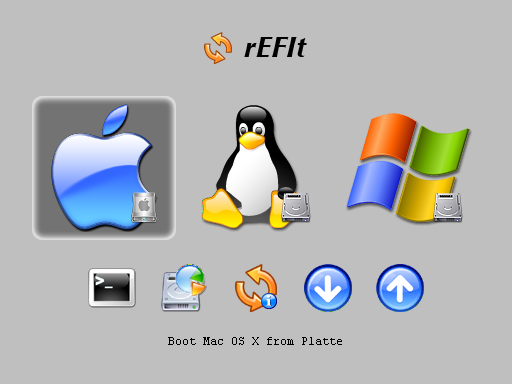
rEFIt Boot Screen
For either the Boot Camp or rEFIt solutions, I would recommend the gamer determine the precise hardware configuration of their Mac and acquire the latest Windows hardware drivers from the appropriate sources before starting the OS installation process. Often only the most current drivers will provide the desired gaming experience for the newest games (graphics card drivers being particularly fickle.). At the very least, ensure that you have the needed network (NIC) driver, so that once Windows is installed and booted, you can retrieve other needed drivers from the Internet.
You'll also want to get your hands on a decent keyboard and mouse. While the Apple realizations exude a Bang & Olufsen elegance, they're utterly useless for any kind of real gaming.
See you on the battlefields!
Earning Your Pathfinding Merit Badge: How Game Characters Navigate Their Game World. A µ post.
As most gamers probably have, I've pondered what mechanism must games use to allow the NPCs in the game to find their way around the game world. Why did games like F.E.A.R. and Halo seem to exhibit more realistic NPC movements?
I was exposed more deeply to the problem when I embarked on building a simple FPS game from scratch including AI, rendering, and netcode. I'd originally planned on a game that mirrored my neighborhood so my friends and I could run around familiar territory and maim each other. It ended up being a shoot-the-aliens sci-fi game: I'm no artist, and it was easier for me to make characters that didn't look like pale imitations of humans.
I'd pulled out all my references in preparation for writing a blog entry outlining the basics of the techniques used for pathfinding in games, when I happened upon a most excellent overview written by a game developer.
They do a much better job than I think I could have, you can view the overview at Fixing Pathfinding Once and For All at the Game/AI blog. Nice graphical explanations, with videos demonstrating the differences in pathfinding strategies.
Other useful background information can be found at A* Pathfinding for Beginners and a short entry at Wikipedia.
My own personal references are the superb four volumes of AI Game Programming Wisdom, and the equally excellent Game Programming Gems, now up to eight volumes with the most recent 2010 release. I was heavily influenced by reading the more academic treatments found in both Artificial Intelligence for Games by Ian Millington by and Behavioral Mathematics for Game AI by Dave Mark.
If you have any interest in how realistic character movement is accomplished in games, I highly recommend taking a look at the links, and if you decide to program your own, I can't think of better reference works than the book series I've used.
I was exposed more deeply to the problem when I embarked on building a simple FPS game from scratch including AI, rendering, and netcode. I'd originally planned on a game that mirrored my neighborhood so my friends and I could run around familiar territory and maim each other. It ended up being a shoot-the-aliens sci-fi game: I'm no artist, and it was easier for me to make characters that didn't look like pale imitations of humans.
I'd pulled out all my references in preparation for writing a blog entry outlining the basics of the techniques used for pathfinding in games, when I happened upon a most excellent overview written by a game developer.
They do a much better job than I think I could have, you can view the overview at Fixing Pathfinding Once and For All at the Game/AI blog. Nice graphical explanations, with videos demonstrating the differences in pathfinding strategies.
Other useful background information can be found at A* Pathfinding for Beginners and a short entry at Wikipedia.
My own personal references are the superb four volumes of AI Game Programming Wisdom, and the equally excellent Game Programming Gems, now up to eight volumes with the most recent 2010 release. I was heavily influenced by reading the more academic treatments found in both Artificial Intelligence for Games by Ian Millington by and Behavioral Mathematics for Game AI by Dave Mark.
If you have any interest in how realistic character movement is accomplished in games, I highly recommend taking a look at the links, and if you decide to program your own, I can't think of better reference works than the book series I've used.
I Know What You Did Last Summer: Omniscient Debugging.
I've been doing some coding using the recently released Visual Studio 2010 from Microsoft to experiment with some of the new features and capabilities added since the release of version 2008, my day to day coding platform.
One of the more interesting and very useful features added (only in the Ultimate edition, unfortunately) is IntelliTrace historical debugging. The ability to debug an application while in effect manipulating time (going backwards in the execution history, for example) is known as Omniscient Debugging. The term is properly used when referring to the eponymous open source debugger by Bill Lewis, a computer scientist at Lambda Computer Science and Tufts University, but has become part of the vernacular and a synecdoche for such debuggers.
For readers that are not programmers, the "debugging" of programs is part of the life of any developer. Any sufficiently complex application is likely to have a few "bugs", cases where the expected behavior of the application is not observed to happen. This can be caused by any number of things, from incorrect specification of the design, mistakes in translating the design into program code, use cases that were not considered, bugs in the very tools used to produce the application, etc.
By way of example, let us consider the following tiny application (written in a form of psuedocode):
(define add_two_numbers using Number1, Number2 as (return Number1 * Number2))
The developer hands this off to the users, who start using the new routine add_two_numbers:
add_two_numbers 0,0 → 0
add_two_numbers 2,2 → 4
add_two_numbers 4,4 → 16
Oops! The first two test cases return the proper expected results, but the third returns 16 instead of the expected 8. In our admittedly trival example, we can see from visual inspection the programmer mistakenly put the multiplication operator "*" where the addition operator "+" should have been.
In real applications, mistakes may be buried in hundreds of thousands of lines of program code, and visual inspection is seldom practical. This is where the traditional debugger comes into play for the developer.
A debugger allows the programmer to observe the execution of the application under consideration, by showing exactly where in the execution stream the application is, and allowing the viewing and changing of variables and storage for the application, setting "breakpoints" where the programmer wishes to temporarily halt the execution, stepping through the execution one step at a time, stopping when certain conditions are met, and in some cases even allowing the changing of the program's state.

Workspace for a typical debugger, in this case the WinPDB debugger debugging itself.
These capabilities greatly assist the developer in the determination and correction of problem cases. In our example, one could imagine the developer has determined the problem lies in the add_two_numbers routine (imagine of course that the routine is sufficiently large that simple inspection is not an option). By utilizing the debugger, the developer could execute the application, requesting that execution be paused when the add_two_numbers routine is entered.
At that point, the developer could step through the execution of the routine, observing the flow through the source code step-by-step. The source of the problem would of course become apparent, and could be quickly remedied.
In the case of severe bugs, an application may "crash". In some cases, a "crash dump" will be produced by the execution environment. This contains information about the state of the application at the time of the crash. This information can be used by the developer with the debugger to analyze the state of the application when it crashed, and observer the contents of variables, the place in the source code the execution was at the moment of the crash, and basic information about the path by which the application came to that place.
A core problem with this model of debugging, however, is that detailed information about the execution path and program states leading up to the bug or crash is generally not available, even in a detailed crash dump file. This forces the developer to deduce where the problem might be and then test that hypothesis with the debugger by setting conditions and breakpoints while analyzing the application flow. This will usually lead to a more refined hypothesis, leading to further debugging, leading to a more refined hypothesis, nearly ad infinitum (or at least it can feel that way) until the problem is found. In cases where the bug is sporadic, the programmer may have difficulty even reproducing the problem.
This can be a very time consuming and taxing practice for the programmer involved!
Ideally, the programmer would be able to observe the state of execution for the application at any point in time of the execution lifetime.
That is precisely the capability that omniscient debugging brings to the tool set of the programmer. The concept of such historical debugging has been around for decades, but implementations proved impractical for most of this time. The first truly practical and usable example is surely the Omniscient Debugger (ODB) of Bill Lewis. A very detailed paper by Bill can be seen in Debugging Backwards in Time, and a most interesting video lecture of the same name is hosted by Google. You can view these to garner details on how this functionality is achieved, with examples of the kinds of bugs that are vastly simpler to find by taking advantage of this kind of technology.
With Visual Studio 2010, Microsoft has incorporated and extended this capability and technology, calling it IntelliTrace. Supporting the historical debugging of managed C# and Visual Basic, with experimental support for F#, the product promises to make the work of developers on the Microsoft platform vastly more productive. Details of the new capabilities can be found in the MSDN articles Debugging With IntelliTrace and Debugging Applications with IntelliTrace.
Open source developers can avail themselves of historical debugging with the aforementioned ODB, TOD and GDB debuggers.
I know what you're thinking. More importantly, I know what you were thinking...
One of the more interesting and very useful features added (only in the Ultimate edition, unfortunately) is IntelliTrace historical debugging. The ability to debug an application while in effect manipulating time (going backwards in the execution history, for example) is known as Omniscient Debugging. The term is properly used when referring to the eponymous open source debugger by Bill Lewis, a computer scientist at Lambda Computer Science and Tufts University, but has become part of the vernacular and a synecdoche for such debuggers.
For readers that are not programmers, the "debugging" of programs is part of the life of any developer. Any sufficiently complex application is likely to have a few "bugs", cases where the expected behavior of the application is not observed to happen. This can be caused by any number of things, from incorrect specification of the design, mistakes in translating the design into program code, use cases that were not considered, bugs in the very tools used to produce the application, etc.
By way of example, let us consider the following tiny application (written in a form of psuedocode):
(define add_two_numbers using Number1, Number2 as (return Number1 * Number2))
The developer hands this off to the users, who start using the new routine add_two_numbers:
add_two_numbers 0,0 → 0
add_two_numbers 2,2 → 4
add_two_numbers 4,4 → 16
Oops! The first two test cases return the proper expected results, but the third returns 16 instead of the expected 8. In our admittedly trival example, we can see from visual inspection the programmer mistakenly put the multiplication operator "*" where the addition operator "+" should have been.
In real applications, mistakes may be buried in hundreds of thousands of lines of program code, and visual inspection is seldom practical. This is where the traditional debugger comes into play for the developer.
A debugger allows the programmer to observe the execution of the application under consideration, by showing exactly where in the execution stream the application is, and allowing the viewing and changing of variables and storage for the application, setting "breakpoints" where the programmer wishes to temporarily halt the execution, stepping through the execution one step at a time, stopping when certain conditions are met, and in some cases even allowing the changing of the program's state.

Workspace for a typical debugger, in this case the WinPDB debugger debugging itself.
At that point, the developer could step through the execution of the routine, observing the flow through the source code step-by-step. The source of the problem would of course become apparent, and could be quickly remedied.
In the case of severe bugs, an application may "crash". In some cases, a "crash dump" will be produced by the execution environment. This contains information about the state of the application at the time of the crash. This information can be used by the developer with the debugger to analyze the state of the application when it crashed, and observer the contents of variables, the place in the source code the execution was at the moment of the crash, and basic information about the path by which the application came to that place.
A core problem with this model of debugging, however, is that detailed information about the execution path and program states leading up to the bug or crash is generally not available, even in a detailed crash dump file. This forces the developer to deduce where the problem might be and then test that hypothesis with the debugger by setting conditions and breakpoints while analyzing the application flow. This will usually lead to a more refined hypothesis, leading to further debugging, leading to a more refined hypothesis, nearly ad infinitum (or at least it can feel that way) until the problem is found. In cases where the bug is sporadic, the programmer may have difficulty even reproducing the problem.
This can be a very time consuming and taxing practice for the programmer involved!
Ideally, the programmer would be able to observe the state of execution for the application at any point in time of the execution lifetime.
That is precisely the capability that omniscient debugging brings to the tool set of the programmer. The concept of such historical debugging has been around for decades, but implementations proved impractical for most of this time. The first truly practical and usable example is surely the Omniscient Debugger (ODB) of Bill Lewis. A very detailed paper by Bill can be seen in Debugging Backwards in Time, and a most interesting video lecture of the same name is hosted by Google. You can view these to garner details on how this functionality is achieved, with examples of the kinds of bugs that are vastly simpler to find by taking advantage of this kind of technology.
With Visual Studio 2010, Microsoft has incorporated and extended this capability and technology, calling it IntelliTrace. Supporting the historical debugging of managed C# and Visual Basic, with experimental support for F#, the product promises to make the work of developers on the Microsoft platform vastly more productive. Details of the new capabilities can be found in the MSDN articles Debugging With IntelliTrace and Debugging Applications with IntelliTrace.
Open source developers can avail themselves of historical debugging with the aforementioned ODB, TOD and GDB debuggers.
I know what you're thinking. More importantly, I know what you were thinking...
Wednesday, May 12, 2010
Life Goes On: Further Ruminations on Conway's Game of Life.
Conway's Game of Life, as I noted in an earlier blog entry An Alien Message? is an utterly fascinating example of Cellular Automata, capable of mind boggling complexity from an incredibly simple set of base rules.
Start the video, and observe the area where the "gate" is in the lower left middle. Passing through it will be Life "Spaceships" spaced precisely as the sequence of primes.
As discussed in my earlier entry, patterns for the game exist that create a Universal Turing Machine, meaning the game can "compute" in the same way that any program can. If it can be done in any programming language, so it can be done in the Game of Life using such a pattern. Mind blowing!
 Wolfram extensively discusses the relationship of these objects to nature, modeling complex behaviors and results with simple basic starting seeds. A good example is that of certain seashells, where the complex patterns of their shell is generated by natural cellular automata.
As a further example of how the game can "compute" in the same way that a traditional computer and programming language can be used to execute programs that compute, I loaded up the recently created seed pattern by Jason Summers for a new type of "Primer" pattern. These patterns in the game will in some fashion "output" the sequence of prime numbers. This particular pattern emits the type of prime number most familiar to us: 2, 3, 5, 7, 11,13... ad infinitum.
Start the video, and observe the area where the "gate" is in the lower left middle. Passing through it will be Life "Spaceships" spaced precisely as the sequence of primes.
Stephen Wolfram, polymath extraordinaire and creator of the widely used mathematical, programming, and graphing workbench Mathematica has written extensively on the subject of cellular automata in his book A New Kind of Science.
In all fairness, while well received overall the book was the target of some rather excoriating reviews by experts in the various related fields, and accusations of intellectual thievery have been raised. Perhaps the most scathing of these and an interesting read on its own can be found in Quantum Information & Computation with the review by Scott Aaronson, a theoretical computer scientist and member of the MIT Electrical Engineering and Computer Science department.
The book is good read nonetheless for a view into the wide applicability of cellular automata, and the five pound nearly 1300 page tome will make a fine doorstop if you find it not to your fancy.
 Wolfram extensively discusses the relationship of these objects to nature, modeling complex behaviors and results with simple basic starting seeds. A good example is that of certain seashells, where the complex patterns of their shell is generated by natural cellular automata.
Wolfram's central point in the book is that complex behaviors and results do not require a complex system for their production.
This culminates in the core of his "new science", the "Principle of computational equivalence".
As eloquently described in the Wikipedia entry for the book, "The principle states that systems found in the natural world can perform computations up to a maximal ("universal") level of computational power. Most systems can attain this level. Systems, in principle, compute the same things as a computer. Computation is therefore simply a question of translating inputs and outputs from one system to another. Consequently, most systems are computationally equivalent. Proposed examples of such systems are the workings of the human brain and the evolution of weather systems."
To get your own hands-on feel for how simple systems can generate incredibly complex results, get yourself a copy of the most excellent Golly cellular automata application where you can explore Conway's Game of Life and other types of cellular systems.
You may find yourself as addicted and fascinated as I am!
Tuesday, May 11, 2010
A Bathroom Reader for Computer Science. A µ post.
Poking around for some pictures for my blog entry that talked about the programming language APL and showcasing an implementation of Conway's Game of Life in one line of the language, I came across an implementation of the Universal Turing Machine in The Game of Life.
As I outlined in that entry, the implications for this are deep. The game, a prime example of cellular automata, consists of a tiny rule set of just four rules yet it can 'compute' anything that can be done by any program you could write for a traditional computing environment using more familiar programming languages. I am honestly awestruck every time I think about this.
The author of this particular pattern for the game has a piece in the book Collision-Based Computing edited by Andrew Adamatzky. The description of the book, published by the top notch academic publisher Springer:
Collision-Based Computing presents a unique overview of computation with mobile self-localized patterns in non-linear media, including computation in optical media, mathematical models of massively parallel computers, and molecular systems.
It covers such diverse subjects as conservative computation in billiard ball models and its cellular-automaton analogues, implementation of computing devices in lattice gases, Conway's Game of Life and discrete excitable media, theory of particle machines, computation with solitons, logic of ballistic computing, phenomenology of computation, and self-replicating universal computers.
Collision-Based Computing will be of interest to researchers working on relevant topics in Computing Science, Mathematical Physics and Engineering. It will also be useful background reading for postgraduate courses such as Optical Computing, Nature-Inspired Computing, Artificial Intelligence, Smart Engineering Systems, Complex and Adaptive Systems, Parallel Computation, Applied Mathematics and Computational Physics.
Yummy! As with most Springer books, prepare to have your wallet 'Springered', in this case to the tune of $130.00. Ouch! I've spent enough already on their superb publications in computer science, physics, and mathematics to purchase a nice car, so I suppose I'll spring (ugh! I couldn't help myself!) for this one too.
I you're interested in computation by non-standard methods, some bordering on incredulousness, this sounds like a fun read.
I figure one chapter per visit.
As I outlined in that entry, the implications for this are deep. The game, a prime example of cellular automata, consists of a tiny rule set of just four rules yet it can 'compute' anything that can be done by any program you could write for a traditional computing environment using more familiar programming languages. I am honestly awestruck every time I think about this.
The author of this particular pattern for the game has a piece in the book Collision-Based Computing edited by Andrew Adamatzky. The description of the book, published by the top notch academic publisher Springer:
Collision-Based Computing presents a unique overview of computation with mobile self-localized patterns in non-linear media, including computation in optical media, mathematical models of massively parallel computers, and molecular systems.
It covers such diverse subjects as conservative computation in billiard ball models and its cellular-automaton analogues, implementation of computing devices in lattice gases, Conway's Game of Life and discrete excitable media, theory of particle machines, computation with solitons, logic of ballistic computing, phenomenology of computation, and self-replicating universal computers.
Collision-Based Computing will be of interest to researchers working on relevant topics in Computing Science, Mathematical Physics and Engineering. It will also be useful background reading for postgraduate courses such as Optical Computing, Nature-Inspired Computing, Artificial Intelligence, Smart Engineering Systems, Complex and Adaptive Systems, Parallel Computation, Applied Mathematics and Computational Physics.
Yummy! As with most Springer books, prepare to have your wallet 'Springered', in this case to the tune of $130.00. Ouch! I've spent enough already on their superb publications in computer science, physics, and mathematics to purchase a nice car, so I suppose I'll spring (ugh! I couldn't help myself!) for this one too.
I you're interested in computation by non-standard methods, some bordering on incredulousness, this sounds like a fun read.
I figure one chapter per visit.
She Blinded Me WIth Science: Tuning Up Your BS Detectors.
PCs, operating systems, specialized hardware, 'tweaks'. Just some of the pieces in the FPS gamer's world. Like any field with such esoterica, there's plenty of snake oil to go around.
Vendors of software tempt the player with promises of improved game performance, while hardware is presented as being able to improve your pings. Mice are made with DPI ratings that need to use scientific notation. The list goes on and on.
What is the intelligent FPS gamer to make of these, and how can they be sure that their money is well spent on things that really can make a difference in their gaming acumen?
We'll tear into a couple of examples in this blog entry, and show how a healthy dose of skepticism toward many of the claims bantered about the Internet by producers of these products and posters in forums could save the gamer time and money.
I've chosen two areas that have in particular pegged my BS detector.
What? How exactly does this piece of free software know how to manage these things better than Microsoft's own OS? Each of the techniques used have been shown to have little if any merit.
It has been shown repeatedly that file fragmentation has little bearing on the performance of Windows and applications for any modern version of Windows. In the days of the FAT file system, defragmentation could make a noticeable difference, but that was because of a file system design that had outgrown its usefulness.
With modern file systems on Windows (NTFS), defragmentation is frankly a waste of time, and its biggest effect is likely physical wear and tear on your hard drive. Defragmentation is strictly a no-no for Solid State drives, and garners absolutely no benefit.
I am not saying defragmentation of the file system under certain corner cases cannot show some measurable change. It can. I am saying such a change will have no material impact in the performance of a game. I invite any reader that can show otherwise with a repeatable test that will pass muster for scientific validity to comment with references to such a test. I know of none.
The 'shutting down of background processes', whether done manually or with some program has long been a 'tweak' recommended in enthusiast forums. In particular, recommendations are made to disable Windows intrinsic services and processes. Utter BS! There is again no test I've ever seen that shows this to have any material effect on game performance. Messing with Windows facilities can have very deleterious effects on the performance and reliability of the OS, and should be considered off limits by any informed gamer.
Now doing this can certainly affect boot times: these Windows components are typically loaded during the boot processes, so this will take some time obviously. But once booted, Windows manages these components quite efficiently, moving them aside if an application such as a game needs resources. There is no material penalty leaving these alone for a gamer.
Of course, if the gamer has tons of junkware or other software installed on their gaming machine, these may cause issues. In these cases, shutting down or disabling these could benefit game play. But seriously, what sane gamer that cares about game performance plays on a machine burdened with junk?
The solution to problems like this is to have a proper gaming environment, and not install crud in the first place. See Swimming in the Septic Tank with my Gaming Buddies for how I set up my gaming machines, a model that I believe is ideal for the serious gamer.
I'm not even sure how to comment on the claim of 'cleaning RAM, and intensifying processor performance'. Windows manages memory. The way it should be managed. 'Memory Cleaners' and 'Extenders' have long been known to belong to the snake oil camp of PC 'tweaks'. Enough said.
Let's answer our three questions for this product.
The marketing materials and hype that surrounded this initial product were mind numbing. Oral Roberts, Tony Robbins, and Billy Mays combined. There was (and still is) however at the same time a suspicious lack of any tests with reasonable protocols and environments showing any material improvement. This kind of hype should always raise an eyebrow. Their current campaign is filled with outlandish testimonials (how many of these players paid for their cards, you might ask) that they remind me of a revival meeting. No scientifically testable numbers to be found anywhere. Big surprise.
The tests I've seen, both in-house and out, seemed to all have been done on hardware that was borderline at best for a serious gamer. While offloading the network processing from an overloaded OS and hardware platform with a mediocre on-board NIC chip may demonstrate measurable performance benefits in network response and even frame rates due to reduced CPU utilization, no gamer with the $300.00 to spend at the time was likely to be running games on such hobbled hardware. And if they were, the money could have been spent far more effectively elsewhere to improve hardware performance (RAM, CPU, add-in NIC, etc.)
I am not aware of any rigorous, scientifically valid test of these products on a modern gaming machine that show any material effect on performance in areas that matter to the gamer. Reviews by magazines and tech sites reflect this view.
In their most recent incarnation, the company has moved the performance metric to a measurement of their own creation, using tools defined and built by them. "Trust me. See the difference it makes in the flow rate of the Flux Capacitors?'' This is starting to smell like some of the marketing done in other hobbies with kook esoterica, like high-end audio products.
Let's look at our BS detector questions for this item:
If the gamer applies these three simple questions when considering a new piece of hardware, software, or the application of some 'twaek' seen in a forum, I think they will save themselves time and money, and avoid going down the rabbit hole of nonsense.
I try to look at the PC and gaming world, and the world in general, through glasses colored by logic and rationality. Take a look at my thoughts on other areas where I think the manure is deep at I Can See CXLVI Frames Per Second!, I Read it in a National Enquirer Survey, it Must Be True!, Mutation on the Bounty, and Port Forwarding: Slaying the Mythical Dragon of Online PC Gaming.
For a great overview of how to think using logic, rationality, and healthy skepticism, check out the materials at The James Randi Educational Foundation and their Million Dollar Challenge, most recently applied to ultra-expensive high-end speaker cables (well, almost applied: the cable vendor chickened out!)
There's also an amusing snippet How to be a Skeptic on WikiHow, check it out!
Update:
After reviewing some of the grotesque marketing tactics at the pages of Bigfoot Networks, I have made a public challenge.
I invite readers to e-mail them with a link (I wanted to put a cool "mailto" link here, but strangely the contact information for the company headquarters doesn't have an e-mail. For that matter, it doesn't have a phone number. The "Texas Office" has a phone number, but I'm not clear if the address has a suite number or a self-storage shed number. In any case, no e-mail there either. If a reader finds one, let me know! I want to donate a PC to a worthy school.)
Their lawyers (must be pretty cheap, if "Grubby" the master Warcraft player they use as a reference "earns more in a year than your average lawyer.") can contact me and my lawyers for details.
In the spirit of my earlier "Bounty" blog entries Mutation on the Bounty and I Can See CXLVI Frames Per Second!, I will open this up to a public challenge at some future date. I first want to give the Bigfoots at Bigfoot a chance to accept it.
"Grubby". That's a good one. I wonder how much pings really matter for flashing pink hooves on the royal mount, or whatever they call them in those kind of games like Warcraft where cat-like reactions are required. Not!
The challenge has beeen moved to its own entry here.
As an aside, as per the earlier bounties, I'll not be posting any anecdotal comments from readers claiming they've "seen" this particular bigfoot. If you think you can meet this challenge and are able to demonstrate the ability and willingness to suffer the penalty of a loss, or if you have an idea for a challenge related to this that you want to propose, do so via a comment or email. Again, I'll not be posting any of the "Well, I can tell the difference 'cause my cat says so" genre of comments.
Vendors of software tempt the player with promises of improved game performance, while hardware is presented as being able to improve your pings. Mice are made with DPI ratings that need to use scientific notation. The list goes on and on.
What is the intelligent FPS gamer to make of these, and how can they be sure that their money is well spent on things that really can make a difference in their gaming acumen?
We'll tear into a couple of examples in this blog entry, and show how a healthy dose of skepticism toward many of the claims bantered about the Internet by producers of these products and posters in forums could save the gamer time and money.
I've chosen two areas that have in particular pegged my BS detector.
- Game Booster, and other software that alleges to 'speed up' your PC for gaming.
- Specialized 'gaming' Network Cards, that make claims of reduced pings and latency.
- Is there a valid reason this should improve my gaming experience?
- Is there a repeatable, scientific test and measurement to validate the claims, or are they largely anecdotal and subjective?
- Even if there is a measurable difference, does it make a difference for gaming?
What? How exactly does this piece of free software know how to manage these things better than Microsoft's own OS? Each of the techniques used have been shown to have little if any merit.
It has been shown repeatedly that file fragmentation has little bearing on the performance of Windows and applications for any modern version of Windows. In the days of the FAT file system, defragmentation could make a noticeable difference, but that was because of a file system design that had outgrown its usefulness.
With modern file systems on Windows (NTFS), defragmentation is frankly a waste of time, and its biggest effect is likely physical wear and tear on your hard drive. Defragmentation is strictly a no-no for Solid State drives, and garners absolutely no benefit.
I am not saying defragmentation of the file system under certain corner cases cannot show some measurable change. It can. I am saying such a change will have no material impact in the performance of a game. I invite any reader that can show otherwise with a repeatable test that will pass muster for scientific validity to comment with references to such a test. I know of none.
The 'shutting down of background processes', whether done manually or with some program has long been a 'tweak' recommended in enthusiast forums. In particular, recommendations are made to disable Windows intrinsic services and processes. Utter BS! There is again no test I've ever seen that shows this to have any material effect on game performance. Messing with Windows facilities can have very deleterious effects on the performance and reliability of the OS, and should be considered off limits by any informed gamer.
Now doing this can certainly affect boot times: these Windows components are typically loaded during the boot processes, so this will take some time obviously. But once booted, Windows manages these components quite efficiently, moving them aside if an application such as a game needs resources. There is no material penalty leaving these alone for a gamer.
Of course, if the gamer has tons of junkware or other software installed on their gaming machine, these may cause issues. In these cases, shutting down or disabling these could benefit game play. But seriously, what sane gamer that cares about game performance plays on a machine burdened with junk?
The solution to problems like this is to have a proper gaming environment, and not install crud in the first place. See Swimming in the Septic Tank with my Gaming Buddies for how I set up my gaming machines, a model that I believe is ideal for the serious gamer.
I'm not even sure how to comment on the claim of 'cleaning RAM, and intensifying processor performance'. Windows manages memory. The way it should be managed. 'Memory Cleaners' and 'Extenders' have long been known to belong to the snake oil camp of PC 'tweaks'. Enough said.
Let's answer our three questions for this product.
- There's no valid reason this product should have any material affect for a properly configured gaming environment. If you have junk software baggage getting in the way of your gaming pleasure, uninstall it or just build a proper environment in the first place.
- I've seen no repeatable, scientifically valid test to validate the claims for this product when installed in a proper gaming environment. Only anecdotal claims, about as valid as the miracle cures claimed for colon cleansing.
- Since there does not appear to be a measurable difference on a properly setup PC, I'd expect the product to have no material effect. So it doesn't matter to the gamer.
The marketing materials and hype that surrounded this initial product were mind numbing. Oral Roberts, Tony Robbins, and Billy Mays combined. There was (and still is) however at the same time a suspicious lack of any tests with reasonable protocols and environments showing any material improvement. This kind of hype should always raise an eyebrow. Their current campaign is filled with outlandish testimonials (how many of these players paid for their cards, you might ask) that they remind me of a revival meeting. No scientifically testable numbers to be found anywhere. Big surprise.
The tests I've seen, both in-house and out, seemed to all have been done on hardware that was borderline at best for a serious gamer. While offloading the network processing from an overloaded OS and hardware platform with a mediocre on-board NIC chip may demonstrate measurable performance benefits in network response and even frame rates due to reduced CPU utilization, no gamer with the $300.00 to spend at the time was likely to be running games on such hobbled hardware. And if they were, the money could have been spent far more effectively elsewhere to improve hardware performance (RAM, CPU, add-in NIC, etc.)
I am not aware of any rigorous, scientifically valid test of these products on a modern gaming machine that show any material effect on performance in areas that matter to the gamer. Reviews by magazines and tech sites reflect this view.
In their most recent incarnation, the company has moved the performance metric to a measurement of their own creation, using tools defined and built by them. "Trust me. See the difference it makes in the flow rate of the Flux Capacitors?'' This is starting to smell like some of the marketing done in other hobbies with kook esoterica, like high-end audio products.
Let's look at our BS detector questions for this item:
- Pings are important to gamers. They're also largely out of the gamer's control. Once the gamer's packets are on the WAN, there's nothing they can do to improve pings. Probably the reason the company dropped this as their marketing silver bullet, and moved to new nonsense. There's no valid reason improvements in the new metric should result in a material improvement of the gaming experience.
- The only test with any sort of measurement for the current product ("Killer 2100") extant at this time is the in-house test of the in-house created metric using the in-house created tool. There have been no scientifically valid tests showing any material benefit to a gamer. Suspiciously, there are absolutely no details in the marketing diarrhea found on the company site describing the hardware configuration used for their comparison. Lots of "testimonials" though. Sound like a late night TV commercial to you?
- Even if the results of the in-house test are valid, that this would make any material difference to game play strains credulity. Like audio cable makers that charge tens of thousands of dollars for a pair of speaker cables, claiming the incredible improvements wrought by the 10 MHz bandwidth of their cable. Problem is, human hearing drops out orders of magnitude lower in the spectrum, and there has never been a scientifically valid test to show any benefit of such cables. The numbers look good in their own tests for the NIC, as they do for the speaker cables. They just don't matter.
If the gamer applies these three simple questions when considering a new piece of hardware, software, or the application of some 'twaek' seen in a forum, I think they will save themselves time and money, and avoid going down the rabbit hole of nonsense.
I try to look at the PC and gaming world, and the world in general, through glasses colored by logic and rationality. Take a look at my thoughts on other areas where I think the manure is deep at I Can See CXLVI Frames Per Second!, I Read it in a National Enquirer Survey, it Must Be True!, Mutation on the Bounty, and Port Forwarding: Slaying the Mythical Dragon of Online PC Gaming.
For a great overview of how to think using logic, rationality, and healthy skepticism, check out the materials at The James Randi Educational Foundation and their Million Dollar Challenge, most recently applied to ultra-expensive high-end speaker cables (well, almost applied: the cable vendor chickened out!)
There's also an amusing snippet How to be a Skeptic on WikiHow, check it out!
Update:
After reviewing some of the grotesque marketing tactics at the pages of Bigfoot Networks, I have made a public challenge.
I invite readers to e-mail them with a link (I wanted to put a cool "mailto" link here, but strangely the contact information for the company headquarters doesn't have an e-mail. For that matter, it doesn't have a phone number. The "Texas Office" has a phone number, but I'm not clear if the address has a suite number or a self-storage shed number. In any case, no e-mail there either. If a reader finds one, let me know! I want to donate a PC to a worthy school.)
Their lawyers (must be pretty cheap, if "Grubby" the master Warcraft player they use as a reference "earns more in a year than your average lawyer.") can contact me and my lawyers for details.
In the spirit of my earlier "Bounty" blog entries Mutation on the Bounty and I Can See CXLVI Frames Per Second!, I will open this up to a public challenge at some future date. I first want to give the Bigfoots at Bigfoot a chance to accept it.
"Grubby". That's a good one. I wonder how much pings really matter for flashing pink hooves on the royal mount, or whatever they call them in those kind of games like Warcraft where cat-like reactions are required. Not!
The challenge has beeen moved to its own entry here.
As an aside, as per the earlier bounties, I'll not be posting any anecdotal comments from readers claiming they've "seen" this particular bigfoot. If you think you can meet this challenge and are able to demonstrate the ability and willingness to suffer the penalty of a loss, or if you have an idea for a challenge related to this that you want to propose, do so via a comment or email. Again, I'll not be posting any of the "Well, I can tell the difference 'cause my cat says so" genre of comments.
Subscribe to:
Posts (Atom)

 Posts
Posts


